Discover the magic of the Stream Deck, a multitasking tool that goes beyond streaming. Learn how custom buttons with visuals simplify complex tasks and boost productivity. The speaker shares insights on using the device for video calls, time tracking, and even home automation. Hear how transitioning between work modes becomes a breeze with a single button press. With these innovative configurations, the Stream Deck transforms daily workflows into an efficient control room.
21:13
forum Ask episode
web_stories AI Snips
view_agenda Chapters
auto_awesome Transcript
info_circle Episode notes
question_answer ANECDOTE
Joe's Stream Deck Expansion Story
Joe Casabona shares how since buying his first 15-key Stream Deck five years ago, he expanded to three devices that are essential in his workflow.
He uses them for various tasks from live streaming control to home automation, enhancing work efficiency.
insights INSIGHT
Visual Buttons Beat Keyboard Shortcuts
Stream Decks offer visual custom buttons that help remember complex or rarely used commands better than keyboard shortcuts.
Their integrations with tools like Philips Hue and Ecamm Live enhance ease of use beyond standard shortcut keys.
volunteer_activism ADVICE
Use Stream Deck for Focus and Timers
Use Stream Deck buttons to launch and control focus apps that block distractions and manage notification settings.
Track different work activities by creating dedicated timer buttons in apps like Timery for better work time management.
Get the Snipd Podcast app to discover more snips from this episode
One of my favorite things to do at Disney World growing up was get on attractions and press all the buttons. They really made it feel like you were accomplishing things. Maybe that’s why I like the Stream Deck so much.
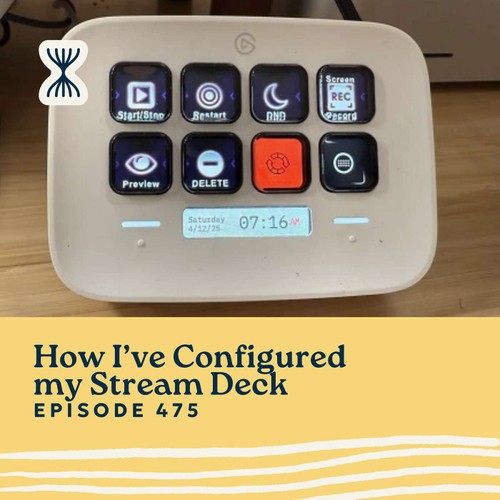
I've been using Stream Decks for about five years now, starting with a 15-key model before expanding to a 32-key XL and adding two more devices to my setup. These programmable button panels have become an essential part of my workflow, helping me control everything from video production to home automation.
While many see Stream Decks as tools just for streamers, I've integrated them deeply into my daily work—managing focus sessions, tracking time, controlling my lights, and executing shortcuts that save me dozens of clicks every day. They've become my personal control room that helps me work more efficiently and stay focused, whether I'm recording podcasts, creating videos, or doing deep work.
Top Takeaways
Stream Decks aren't just for streamers—they're incredibly versatile productivity tools that can automate repetitive tasks across your entire workflow, from video production to time tracking and home automation.
Custom buttons with visual icons make actions more memorable than keyboard shortcuts, especially for complex or infrequently used commands that are hard to remember.
Controlling my environment (like turning lights on/off, changing colors, or setting focus modes) with a single button press helps me transition between different work modes instantly, saving mental energy and reducing friction.
———— Streamlined Solopreneur is the podcast for solopreneurs who want to automate their business and take time off worry-free. Each week, Joe Casabona shares practical systems, tools, and strategies to help you reclaim your time and run your business without sacrificing your the rest of your life, or your health.
Start with the free Solopreneur Sweep — a step-by-step method for finding where your business is losing time: https://streamlined.fm/sweep
If this episode helped you, leaving a review on Apple Podcasts helps other solopreneurs find the show — it only takes a minute and means a lot.

 Streamlined Solopreneur: Automate Your Business, Take Time Off Worry-Free